Published Date: November 14, 2026
Written By:Siddharth Pandya
A customer books a mini truck, but what happens next? The platform must find an available vehicle, calculate the fare, assign a suitable driver, and track the delivery until completion. Apps like Porter bring these operations together, making goods transportation more accessible for individuals and businesses.
However, developing a logistics app like Porter involves much more than creating a vehicle-booking interface. It requires reliable dispatch algorithms, real-time GPS tracking, dynamic pricing, and efficient trip management. Our team offers logistics software development for businesses that need dispatch, pricing, and tracking built together from the start.
If you’re exploring how to build an app like Porter, this guide covers the business models, essential features, technology stack, development process, estimated costs, and timelines involved in launching your own logistics platform.
How Do Apps Like Porter Work Behind the Scenes?
Porter operates as an on-demand logistics platform that connects customers requiring goods transportation with available commercial vehicle partners. Apps like Porter rely on interconnected systems to manage bookings, allocate vehicles, calculate fares, and coordinate deliveries without requiring manual intervention at every stage.
A Three-Sided Platform: Customers, Drivers, and Logistics Operators
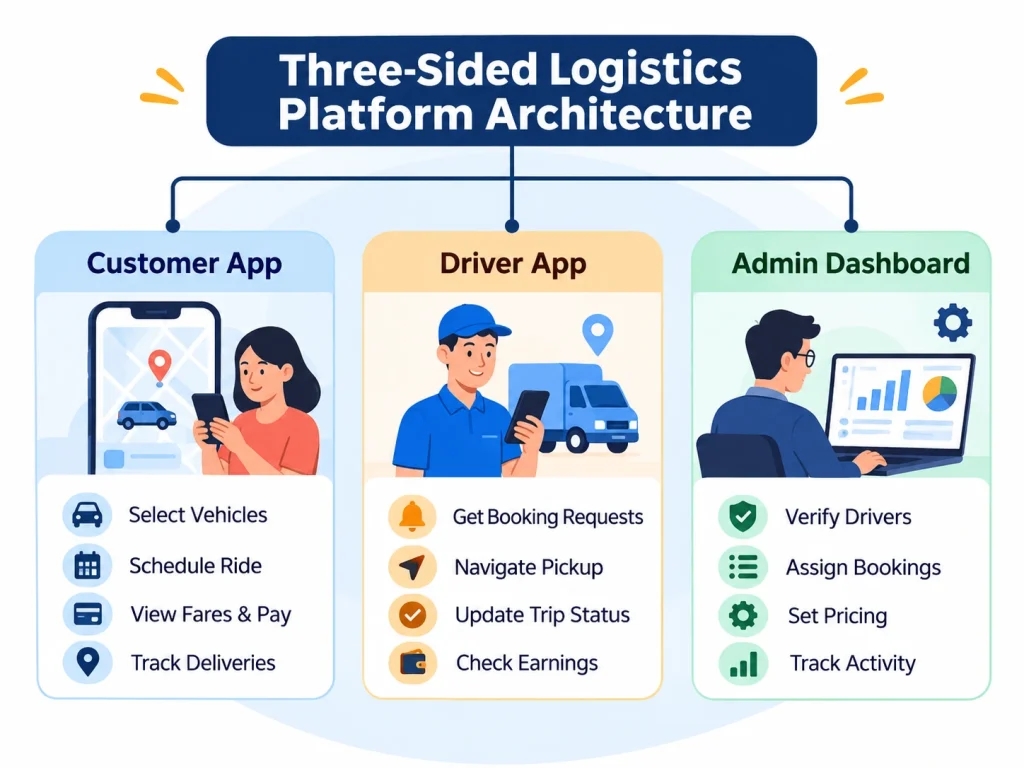
A Porter like application typically consists of three interfaces, each serving a different operational purpose:
- Customer App: Allows users to select vehicles, schedule transportation, view estimated fares, make payments, and track deliveries.
- Driver App: Helps transportation partners receive booking requests, navigate pickup locations, update trip statuses, and monitor earnings.
- Admin Dashboard: Gives operators control over driver verification, booking assignments, pricing configurations, fleet activity, and payment settlements.
The Systems Operating Behind Every Transportation Booking
Five backend systems coordinate these interfaces:
- Booking Management: Records transportation requests and manages booking statuses.
- Vehicle Allocation: Matches bookings with eligible vehicles and available drivers.
- Pricing & Payments: Calculates transportation charges and processes transactions.
- Trip Tracking: Monitors vehicle movements and confirms deliveries.
- Operations Management: Oversees fleet availability, commissions, cancellations, and disputes.
Which Business Model Should You Choose for a Porter Like App?
Before developing a porter like app, you need to decide how your platform will operate, who will provide the vehicles, and how the business will generate revenue. Different business models require different booking workflows, dispatch systems, pricing structures, and fleet management capabilities.
On-Demand Truck Booking Marketplace
This model connects customers with independent drivers and vehicle owners. The platform earns commissions or booking fees on completed trips. It requires driver onboarding, real-time vehicle discovery, automated dispatch, and commission management.
Dedicated Fleet Booking Application
Designed for businesses operating their own commercial vehicles, this model focuses on vehicle scheduling, fleet utilization, and centralized dispatch. It provides greater control over transportation operations without relying heavily on third-party drivers.
B2B Logistics Booking Platform
This model serves retailers, wholesalers, manufacturers, and enterprises requiring regular transportation services. It supports recurring bookings, contract-based pricing, business accounts, and consolidated invoicing, often integrating with ERP or order management systems.
Hybrid Transportation Marketplace
A hybrid platform combines company-owned vehicles with independent transportation partners. It requires flexible dispatch rules, multiple pricing structures, and separate commission and settlement workflows.
How Does a Logistics App Like Porter Process a Booking?
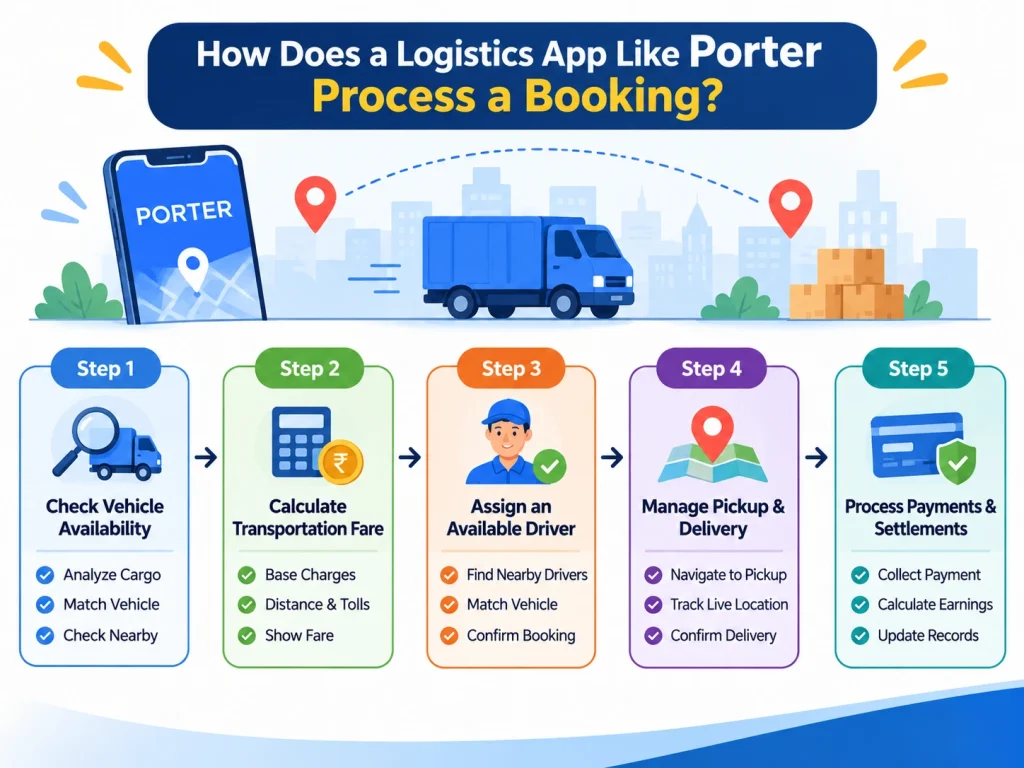
Every booking on a logistics app like Porter triggers a series of backend operations, from identifying suitable vehicles to completing payments. For example, when a retailer books a mini truck to transfer inventory between warehouses, the platform processes the request through five stages.
Step 1: Check Vehicle Availability and Load Compatibility
The system evaluates cargo weight, dimensions, and transportation requirements to identify suitable vehicle categories. It then checks available vehicles near the pickup location, filtering out those that cannot accommodate the load.
Step 2: Calculate the Estimated Transportation Fare
The pricing engine calculates the estimated fare using base charges, travel distance, and vehicle-specific rates. It also considers applicable tolls, additional stops, and potential waiting charges before displaying the booking estimate.
Step 3: Match the Booking With an Available Driver
The dispatch engine identifies eligible drivers based on proximity, vehicle suitability, and availability. Booking requests are sent to selected drivers, with automatic reassignment triggered if a driver rejects or fails to respond.
Step 4: Manage Pickup, Transportation, and Delivery
Once assigned, the driver navigates to the pickup location. The platform records arrival and pickup confirmations, updates trip statuses, and shares live GPS tracking. Delivery completion is verified through OTP, photographs, or digital signatures.
Step 5: Process Payments and Driver Settlements
After delivery, the system finalizes applicable charges, processes customer payments, and calculates driver earnings and platform commissions. It also records refunds, adjustments, and transaction details for reconciliation.
Essential Features to Include in a Porter Like App
Building a porter like app requires three interconnected applications that manage customer bookings, driver operations, and administrative activities. Each interface needs specific features to coordinate transportation requests, vehicle allocation, trip execution, and payments.
Customer App Features
The customer application should simplify vehicle booking while providing clear pricing, delivery visibility, and convenient payment options.
| Feature | Functionality |
| User Registration | OTP-based login, customer profiles, and saved addresses for faster bookings. |
| Vehicle Selection | Choose vehicles based on cargo weight, dimensions, and load capacity. |
| Instant & Scheduled Booking | Request immediate transportation or schedule pickups in advance. |
| Fare Estimation | View estimated charges based on distance, vehicle category, and additional services. |
| Multiple Stops | Add several pickup or delivery locations within a single booking. |
| Real-Time Tracking | Monitor vehicle location, trip progress, and estimated arrival times. |
| Digital Payments | Pay through UPI, cards, wallets, or integrated payment gateways. |
| Booking History | Access previous trips, download invoices, and repeat bookings. |
| Customer Support | Request cancellations, report issues, and resolve booking disputes. |
Driver App Features
The driver application manages transportation requests, navigation, delivery updates, and earnings while keeping drivers connected to the dispatch system.
| Feature | Functionality |
| Driver Onboarding | Verify identity, driving license, and commercial vehicle documents. |
| Availability Management | Set online/offline status to control incoming booking requests. |
| Booking Requests | Receive trip details, pickup locations, and estimated fare or earnings, where applicable. |
| Navigation | Access route directions for pickups and deliveries. |
| Trip Management | Confirm pickups, update trip progress, and mark deliveries complete. |
| Waiting Time Tracking | Record additional waiting time for applicable fare adjustments. |
| Proof of Delivery | Verify completed deliveries using OTPs, photographs, or digital signatures. |
| Earnings Dashboard | Monitor completed trips, incentives, commissions, and payment settlements. |
Admin Dashboard Features
The admin dashboard provides centralized control over transportation operations, driver availability, pricing rules, and financial transactions.
| Feature | Functionality |
| Driver Management | Verify documents, approve registrations, and manage drivers and fleet partners. |
| Booking Monitoring | Track active, scheduled, completed, and cancelled transportation requests. |
| Dispatch Management | Assign vehicles manually, automate allocation, and reassign rejected bookings. |
| Pricing Configuration | Configure vehicle-specific fares, distance charges, and service-area pricing. |
| Fleet Monitoring | View active vehicles, driver locations, and real-time availability. |
| Commission Management | Calculate platform commissions, driver earnings, and pending settlements. |
| Dispute Resolution | Handle cancellations, payment adjustments, refunds, and customer complaints. |
| Analytics | Analyze booking volumes, revenue, cancellation rates, and driver performance. |
5 Core Systems Behind On-Demand Logistics App Development
The complexity of on-demand logistics app development lies in building backend systems that coordinate bookings, vehicles, drivers, pricing, and payments in real time. Businesses planning to hire logistics app developers should prioritize these five systems to support reliable transportation operations.
1. Vehicle Matching and Automated Dispatch Engine
The dispatch engine matches transportation requests with available drivers based on proximity, vehicle category, payload capacity, and pickup location. It manages booking acceptance timeouts and automatically reassigns requests when drivers decline or become unavailable. The system also prevents the same driver from being assigned to multiple bookings at the same time, avoiding scheduling conflicts and overlapping trips.
2. Dynamic Fare Calculation Engine
The pricing engine calculates transportation charges using configurable rules for vehicle categories, distance, trip duration, and service locations. It also accounts for minimum fares, tolls, waiting charges, and additional stops. When customers modify booking details, the system recalculates applicable charges.
Example Fare Calculation:
| Pricing Component | Example Charge |
| Base Fare | ₹200 |
| Distance Charge (10 km × ₹20) | ₹200 |
| Additional Stop | ₹100 |
| Waiting Charge | ₹50 |
| Total Estimated Fare | ₹550 |
3. Real-Time GPS Tracking and ETA Calculation
This system collects driver location updates and synchronizes them with active bookings. Mapping APIs calculate routes, travel distances, and estimated pickup or delivery times. During poor connectivity, the application can temporarily store location updates and synchronize them when the connection returns, while identifying stale GPS data to avoid displaying misleading locations.
4. Trip Lifecycle and Exception Management
The backend tracks each booking through defined stages: requested, assigned, driver arrived, picked up, in transit, and delivered. It also handles exceptions such as driver cancellations, customer no-shows, failed pickups, and incomplete deliveries. Automated status changes and administrative intervention help resolve disruptions without losing booking records.
5. Payment, Commission, and Driver Settlement System
The payment system processes cash and digital transactions while maintaining records of customer charges, platform commissions, and driver earnings. It supports scheduled payouts, additional charges, refunds, and payment adjustments. Transaction reconciliation matches completed bookings with collected payments and driver settlements, helping operators identify discrepancies and maintain accurate financial records.
Planning the Backend for Your Logistics App?
Dispatch, pricing, live tracking, and driver payments all need to work together from day one. Share your idea with us and get a clear plan for building them.
Technology Stack Required to Build an App Like Porter
Building an on-demand logistics and mini-truck booking platform like Porter requires a well-planned technology stack to support customer and driver apps, an admin dashboard, and scalable backend services capable of handling multiple bookings and real-time operations.
| Technology Layer | Recommended Technologies |
| Mobile App Development | Flutter, React Native |
| Backend Development | Node.js, Python |
| Frontend Development | React.js, Next.js |
| Database | PostgreSQL, MongoDB |
| Real-Time Communication | WebSockets, Firebase |
| Maps & Navigation | Google Maps API, Mapbox |
| Cloud Infrastructure | AWS, Google Cloud |
| Payment Integration | Razorpay, Stripe |
| Notifications | Firebase Cloud Messaging |
How to Build an App Like Porter: 8 Development Steps
Understanding how to build an app like Porter requires a structured development approach that connects transportation operations with the right technology. Each stage, from defining vehicle categories to launching the dispatch system, influences the platform’s functionality, reliability, and scalability.
Step 1: Define Your Service Area, Vehicle Categories, and Booking Model
Start by determining whether your platform will support intracity deliveries, intercity transportation, or both. Select vehicle categories based on cargo capacity and customer requirements. Finalize your aggregator, owned-fleet, or hybrid model, along with instant or scheduled booking options. Define serviceable locations, operating boundaries, and pricing zones before development begins.
Step 2: Map Booking Workflows and Operational Exceptions
Document the complete booking journey, from vehicle selection and fare estimation to driver assignment and payment settlement. Establish rules for driver acceptance, rejection, cancellations, and refunds. Include exceptions such as vehicle mismatches, failed pickups, and unavailable drivers. Define when the system should automatically resolve issues and when administrators must intervene.
Step 3: Design Customer, Driver, and Admin Interfaces
Create wireframes and interactive prototypes for all three applications. Customer screens should simplify vehicle selection, booking confirmation, and tracking. Driver interfaces must support quick trip acceptance, navigation, and delivery updates. Admin dashboards should provide booking visibility and operational controls. Account for unstable connectivity, especially during active trips.
Step 4: Build the Backend Architecture and Booking Database
Develop backend services for customer accounts, driver availability, vehicle records, bookings, and payments. Use structured databases to maintain trip histories and transaction records. Implement authentication, role-based access controls, and booking status management. Apply database transactions and assignment locks to prevent duplicate driver allocations and conflicting booking updates.
Step 5: Develop the Pricing, Dispatch, and Trip Management Engines
Build configurable pricing rules for distance, vehicle categories, waiting charges, and additional stops. Develop dispatch logic that matches bookings with eligible drivers based on availability and proximity. Implement trip status updates, acceptance timeouts, cancellation handling, and automatic reassignment. Synchronize these operations across customer and driver applications.
Step 6: Integrate Maps, Payments, Notifications, and Verification APIs
Connect mapping services for geolocation, navigation, route calculation, and estimated arrival times. Plan your payment gateway integration early, because UPI, card, and wallet support affects checkout and refund handling. Add SMS and push notifications for booking updates, driver verification services for onboarding, and invoice generation. Include ERP or order management integrations when supporting enterprise customers.
Step 7: Test the Platform Under Real Transportation Conditions
Test simultaneous booking requests, driver cancellations, GPS disconnections, incorrect vehicle selections, and payment failures. Verify that trip statuses remain accurate when network connectivity drops or delivery confirmations are delayed. Conduct load testing to evaluate dispatch performance during peak demand, alongside security, integration, and usability testing.
Step 8: Launch in One City and Scale Operations
Begin with a controlled launch in a limited service area and onboard verified transportation partners. Monitor booking acceptance rates, assignment times, trip completion, driver utilization, and customer complaints. Use operational data to refine dispatch rules and pricing. Expand vehicle categories, service zones, and city coverage once the platform demonstrates consistent performance.
How Much Does It Cost to Build an App Like Porter?
The cost to build an app like Porter can range from approximately ₹18 lakh to ₹1.6 crore or more, depending on the platform’s complexity, features, and development requirements. A single-city application with basic booking and tracking costs considerably less than a multi-city logistics marketplace with automated dispatch, dynamic pricing, and enterprise integrations.
Porter App Development Cost Based on Project Complexity
The estimated Porter app development cost varies according to the platform’s operational scope.
| Project Type | Estimated Development Cost | Included Scope |
| Basic Single-City MVP | ₹18 – 35 lakh | Customer and driver apps, booking, GPS tracking, payments, and admin dashboard |
| Mid-Level Logistics Platform | ₹35 – 80 lakh | Automated dispatch, multiple vehicle categories, advanced pricing, and analytics |
| Advanced Multi-City Platform | ₹80 lakh – ₹1.6 crore+ | Multi-city operations, complex dispatch, enterprise integrations, and advanced automation |
Development Cost Breakdown by Component
Different development components contribute to the overall investment.
| Development Component | Estimated Budget Allocation | Major Cost Drivers |
| Requirement Analysis & UI/UX | 8% | Workflows, wireframes, interface complexity |
| Customer App | 15% | Booking, payments, tracking |
| Driver App | 12% | Navigation, trip updates, earnings |
| Backend & Database | 20% | Architecture, APIs, data management |
| Dispatch & Pricing Engines | 18% | Matching algorithms, fare calculations |
| Admin Dashboard | 10% | Fleet monitoring, reports, controls |
| Third-Party Integrations | 7% | Maps, payments, verification |
| Testing & Deployment | 10% | Performance, security, launch readiness |
What Factors Increase Logistics App Development Cost?
The logistics app development cost increases with the number of supported platforms, vehicle categories, and operational workflows. Custom dispatch algorithms, frequent GPS updates, dynamic pricing, and multi-city configurations require additional development effort. Enterprise integrations, security requirements, scalability expectations, and the development team’s expertise also influence the final budget. If you plan to hire dedicated developers rather than build an in-house team, check their experience with logistics systems, because that experience affects both timeline and budget.
What Are the Ongoing Costs of Maintaining a Porter-Like App?
Beyond development, businesses must budget for cloud hosting, databases, mapping APIs, SMS notifications, payment gateway fees, driver verification, security updates, and technical support.
Software maintenance is separate from operational expenses such as driver acquisition, customer support, marketing, and transportation partner management. Both should be considered when calculating the platform’s total cost of ownership.
How Long Does It Take to Build an App Like Porter?
If you’re wondering how long does it take to build an app like Porter for small business, the development process typically takes 3 to 12 months or more, depending on the platform’s features, technical complexity, and operational requirements.
A basic single-city application can be developed faster, while a multi-city logistics marketplace requires additional time for automated dispatch, advanced pricing, integrations, and performance testing.
| Project Scope | Estimated Timeline |
| Single-City MVP | 3-5 months |
| Multi-Vehicle Logistics Platform | 5-8 months |
| Advanced Multi-City Platform | 8-12+ months |
Development timelines depend on the number of customer, driver, and admin interfaces, the complexity of vehicle-matching algorithms, and custom pricing requirements. Third-party API integrations, security testing, and the development team’s size and expertise also influence delivery schedules.
Build Your Logistics App like Porter With Logix Built Solutions Limited
Planning to launch apps like Porter but unsure where to start? Logix Built helps businesses turn their logistics app ideas into fully functional platforms designed around their transportation operations and business goals.
As a logistics app development company, we specialize in building custom solutions that simplify vehicle booking, automate driver allocation, and improve fleet visibility. Our development expertise covers real-time GPS tracking, dynamic pricing engines, route optimization, payment integrations, and centralized fleet management systems.
Logix Built developed Liftor, a transportation and mobility platform inspired by Porter. The solution connects customers with nearby drivers through automated driver matching, instant ride notifications, live GPS tracking, and real-time trip updates.
Whether you’re developing a single-city truck-booking application, an on-demand transportation marketplace, or a multi-city logistics platform, our team can help you select the right technology, prioritize essential features, and build a scalable solution.
Ready to build your own Porter like app? Connect with Logix Built to discuss your requirements and get a customized development plan and cost estimate.
Frequently Asked Questions
How do apps like Porter manage multiple vehicle categories?
Apps like Porter maintain vehicle profiles containing payload capacity, dimensions, availability, and service areas. When customers request transportation, the system filters suitable vehicles based on cargo requirements and pickup locations. Separate pricing rules and dispatch configurations allow the platform to manage different vehicle categories efficiently.
How much does it cost to hire dedicated developers for a logistics app?
The cost depends on developers’ experience, technical expertise, location, and engagement duration. In India, illustrative monthly rates may range from ₹80,000 to ₹2.5 lakh or more per developer. The overall investment depends on the number of developers required and whether the project needs specialized backend, mobile, or cloud expertise.
How many dedicated developers are needed to build apps like Porter?
A basic Porter-like MVP may require a team of four to six professionals covering mobile development, backend engineering, UI/UX design, and quality assurance. More advanced platforms may need additional specialists for cloud infrastructure, automated dispatch, security, and integrations. Team size ultimately depends on project scope and delivery deadlines.
How do apps like Porter calculate transportation charges?
Transportation charges are calculated using configurable pricing rules based on vehicle category, travel distance, minimum fares, and estimated trip duration. Additional charges may apply for tolls, waiting time, extra stops, or specific services. The pricing engine recalculates fares when customers modify booking details or additional charges arise.

Siddharth Pandya is the Founder, CEO, and Managing Director of Logix Built Solutions Limited, an AI-powered development company specializing in custom software, web, mobile app, and AI-driven solutions for enterprises and startups. With 15+ years of experience in digital innovation and enterprise technology, he leads the company's vision of building intelligent, scalable software solutions across web, mobile, AI/ML, and data science applications. Under his leadership, Logix Built has helped businesses in healthcare, fintech, logistics, e-commerce, real estate, and other sectors improve operational efficiency, adopt AI-powered automation, and gain a competitive edge in their markets.